


Frame.io is a go-to review tool for video teams, but it is built around video. If your work involves sound, from music and podcasts to sound for picture, or you are a freelancer who reviews work with clients, you may need something else.
Quick verdict: Frame.io is the stronger choice for video post-production inside Adobe apps. Pibox is the better Frame.io alternative for audio and video professionals who need client review, versions and approvals in one place, with feedback that lands inside Pro Tools, Cubase, Nuendo or DaVinci Resolve. Pibox also costs less per user: Pro starts at $8 per month billed yearly.
Frame.io vs Pibox at a glance (2026)
Short on time? Here is how Frame.io compares with Pibox.
| Frame.io | Pibox | |
|---|---|---|
| Best for | Video and post-production teams working in Adobe apps | Audio and video professionals and teams who review work with clients, especially where sound matters |
| Pricing | Free plan (2 members, 2 GB). Pro from $15 and Team from $25 per user/month, less when billed yearly | Free plan. Pro from $8 and Team from $16 per user/month billed yearly. Enterprise with custom pricing |
| Video editor integrations | Premiere Pro, After Effects, Final Cut Pro, DaVinci Resolve, Media Composer | DaVinci Resolve (macOS) |
| DAW integrations | No native DAW integration. Pro Tools only through third-party tools such as SoundFlow | Plugin for Pro Tools (AAX), Cubase and Nuendo (VST3). Notes come back as markers at the right timecode |
| Reviewers | Review via share links in the browser | Review via one link in the browser, no account needed |
| Audio review | Video-first | Built for audio: waveform comments, version A/B, lossless and Dolby Atmos playback on paid plans |
| Security | Advanced controls on higher tiers | ISO 27001 certified, private by default, expiring and password-protected links |
Prices are taken from each vendor’s website in November 2026. Check their pricing pages before you buy.
What is Frame.io?
Frame.io is a widely used platform for video review and collaboration, allowing users to upload and share videos, gather feedback through time-stamped comments, and mark up content for approval. It’s highly favored among video editors, filmmakers, and creative professionals for its sleek interface and classic review tools.
People usually look for an alternative for one of four reasons: per-member pricing adds up for small teams and freelancers, the tool is built around video and has no native DAW integration, advanced controls sit on higher tiers, or the interface feels heavy for quick client approvals.
Frame.io strengths and weaknesses
- Strengths: frame-accurate video review, deep integration with Premiere Pro and After Effects, Camera to Cloud, and a mature product used widely in post-production.
- Weaknesses: video-first with no native DAW integration, per-member pricing that adds up for small teams and freelancers, and advanced controls only on higher tiers.
Pibox vs Frame.io: feature breakdown
To understand which platform suits your needs best, let’s compare their core features across several important categories.
1. Audio Review & Feedback
- Frame.io allows users to leave comments and annotations on video files, and while it supports basic audio feedback, its features are better suited for video workflows. Given the lack of the waveform view, the audio-review capabilities are more limited compared to those needed by professional audio teams.
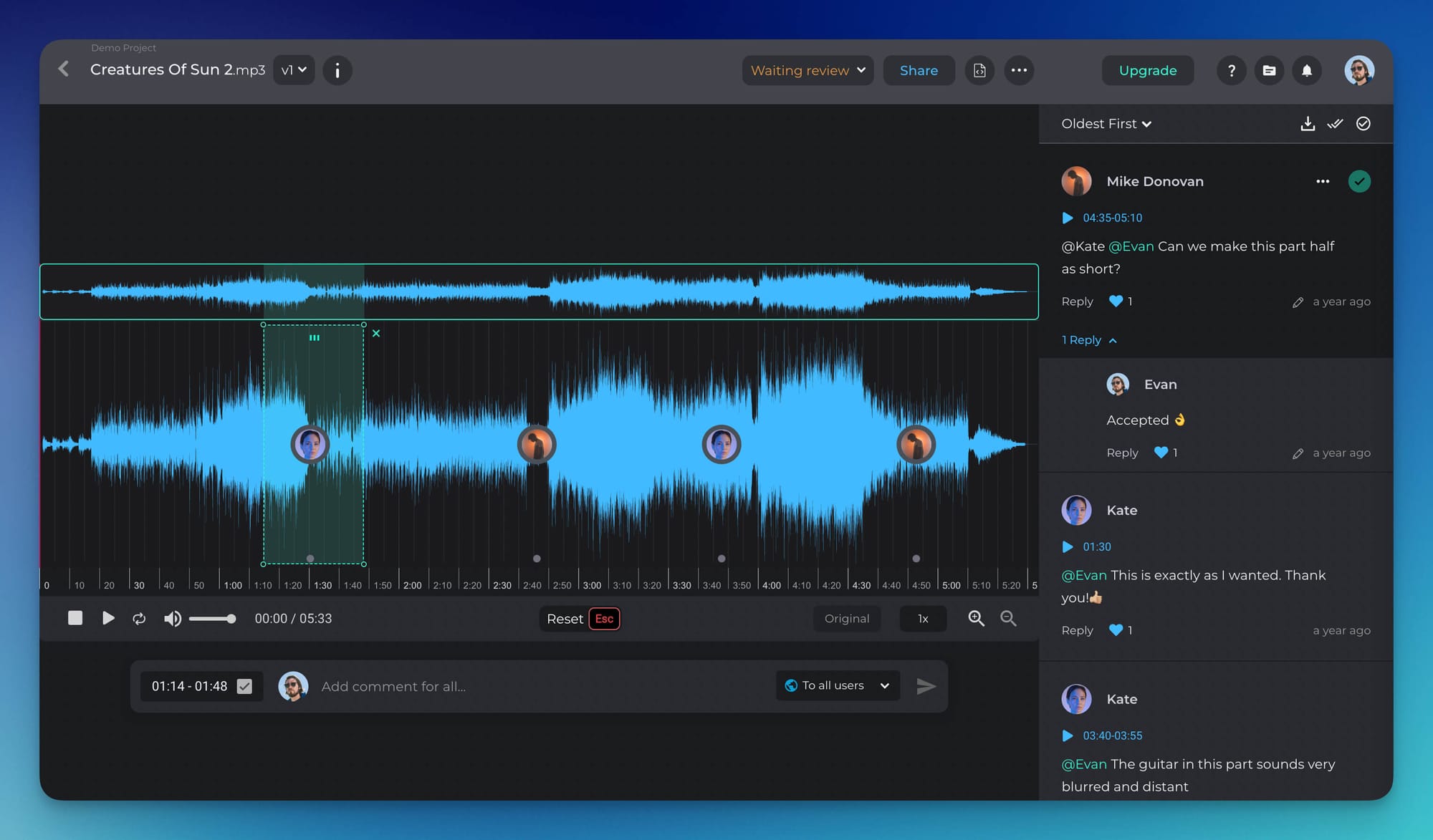
- Pibox shines in the audio space by offering precise, professional waveform-based public or private comments. Users can leave timestamped or range-based feedback directly on the audio, enhancing collaboration. Comments can be left as text or audio. Moreover, Pibox allows users to export feedback in CSV format, streamlining revision tracking and maintaining clarity throughout the audio production process. It also features deep, dynamic waveform zoom, allowing you to navigate audio with DAW-like precision. You can zoom into fine details, zoom out for full context, and move smoothly through long-form files, even 2–3 hour sessions.
2. Sharing & Guest Access
- Frame.io: Frame.io enables file sharing for feedback but requires all collaborators to have a Frame.io account for full access to features. This can create barriers for external reviewers who may not want to sign up or pay for access.
- Pibox: One of Pibox’s standout features is unlimited guest access, even on its free plan. You can share files with collaborators in either review mode or demo mode, giving you control over whether files are for feedback or simply for listening.
3. Cloud Storage & File Management
- Frame.io: Frame.io offers cloud-based storage designed specifically for creative teams working with video. It provides a secure, centralized space where users can upload, share, review, and collaborate on high-resolution media files in real time.
- Pibox: Pibox also offers secure and robust cloud storage, but it's specifically optimized for audio files. It enables users to track file versions, set custom statuses for files, and easily search files via the file manager, ensuring smooth project management.
Unique features that make Pibox stand out
Pibox is designed with audio professionals in mind, offering several unique features that elevate your production workflow:
1. File status tracking
With Pibox, you can easily manage the progression of your audio files through custom status tags—such as “Waiting Review,” “Revision Requested,” or “Approved.” This helps keep everyone on the same page and ensures that no project gets left behind.
2. Integrated communication tools
No more switching between multiple messaging apps. Pibox allows you to communicate with collaborators directly within the platform using project-based chats or private messages. Discuss feedback, brainstorm ideas, and address concerns in real time, keeping all conversations within the context of your project.
3. Metadata tagging
Stay organized with metadata management that allows you to attach important information such as tempo, key, version number, and more to your audio files. This makes it easy to search, filter, and track files, ensuring a smooth workflow even when working with large volumes of content. With metadata tagging, you can create custom fields, like royalty splits, to ensure everyone gets paid accurately.
4. AI tagging
If managing metadata manually sounds overwhelming, Pibox has you covered. The AI Tagging feature uses machine learning and advanced audio analysis to automatically extract details from any uploaded track—including BPM, key, genre, mood, instruments, and more.
5. File-request links
Need a missing file? Simply send a file-request link to collaborators. They can upload the necessary files without having to create a Pibox account, making it easier for external contributors to collaborate without friction.
6. Project & task management
Pibox’s integrated task-management tools allow you to group files, assign tasks, and track progress on your projects. Whether working solo or with a team, you’ll have everything you need to stay organized and on schedule.
7. Playlists for audio projects
For music teams, Pibox provides an easy way to organize and share audio projects. You can group tracks into playlists for albums, podcasts, or soundtracks, streamlining collaboration and feedback. Share entire playlists with your team for quick approval cycles and seamless coordination.
8. Complete audio-production workflow
Pibox offers an end-to-end audio-production solution, reducing track review and approval times by 86%. From initial drafts to final masters, every step of your project can be managed within the platform, ensuring that you never lose track of feedback or file versions.
9. Review inside your audio DAW
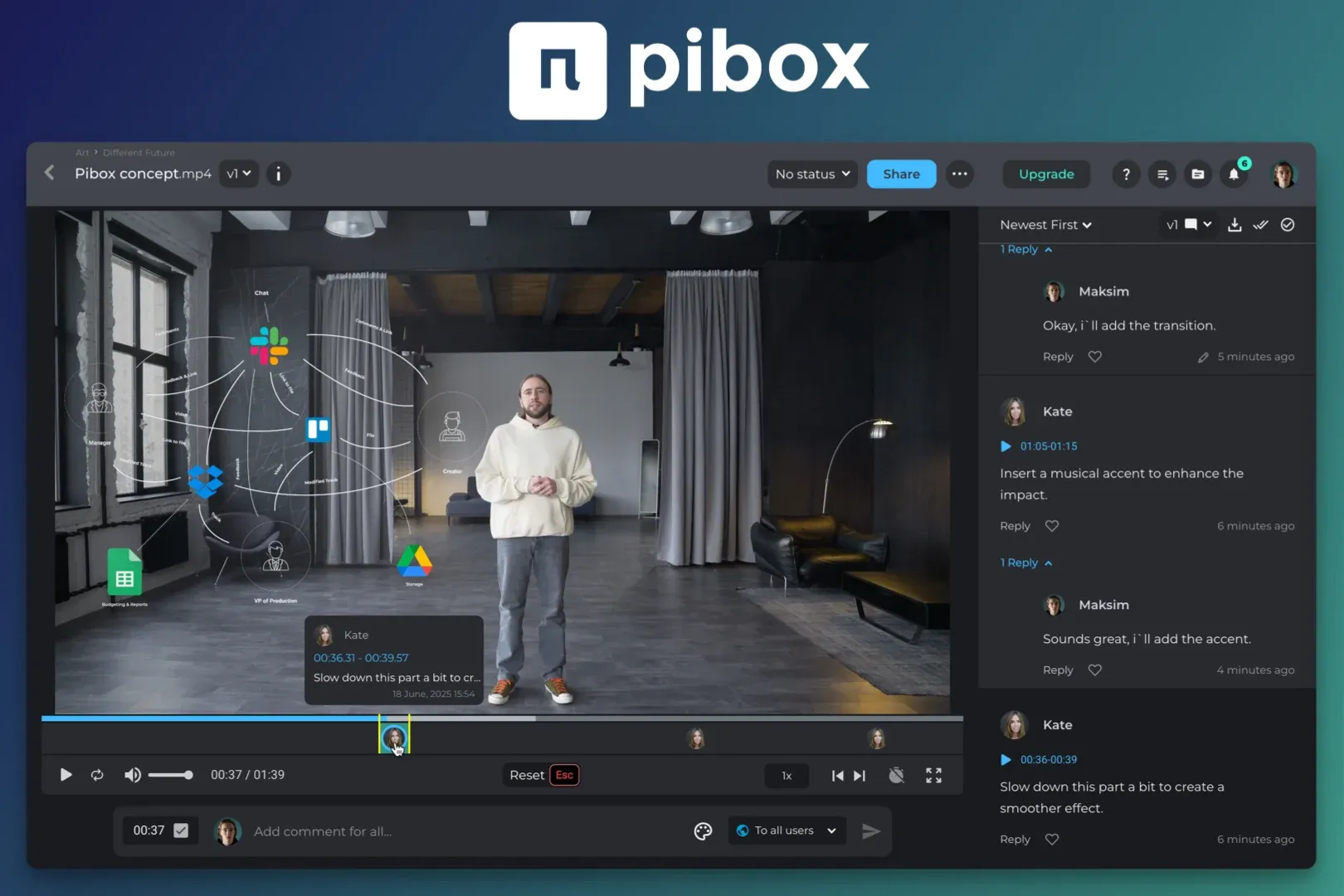
Frame.io’s integrations are built around video editing apps such as Premiere Pro, Final Cut Pro and DaVinci Resolve, and it has no native plugin for a DAW. Pibox covers the audio side: the Pibox plugin works inside Pro Tools, Cubase and Nuendo. Engineers and composers bounce a mix to Pibox from the session, see reviewers’ timestamped notes on their own timeline and A/B the fix against the previous version in sync, which is where audio feedback actually gets fixed.
Why Pibox is a smart choice for audio and video professionals
When working on audio projects, managing feedback, revisions, and files can become overwhelming. Frame.io is primarily built for video, and while it offers basic audio-review tools, it doesn’t provide the specialized features that audio professionals need.
In contrast, Pibox consolidates all the tools you need for audio collaboration into one platform, streamlining the process of giving and receiving feedback, handling revisions, keeping track of ongoing projects, and managing the status of each file at every stage of its lifecycle. With these capabilities and additional features, Pibox is the go-to solution for music producers, sound engineers, podcasters, and anyone in the audio space.
Centralized communication & feedback
Keep your feedback organized with waveform-based comments and project chats. Every piece of feedback is tied directly to a moment in your audio file, so you never have to worry about losing track of feedback or miscommunication.
Efficient file sharing & requests
Forget about cluttered email threads or third-party file-sharing services. Pibox’s file-request feature allows you to easily gather files from collaborators, and you can control whether files are stream-only or downloadable, keeping your work secure.
Stay organized with version control
No more confusion over which file is the latest version. Pibox’s version control lets you track, compare, and restore previous versions of your audio files—helping you avoid mistakes and ensuring you’re always working with the right file.
Test Pibox for free
Still unsure if Pibox is the right fit for your workflow? With the free plan, you can explore all its features and experience how it can improve your audio-production process before upgrading to a paid plan.
Pricing: Frame.io vs. Pibox
When comparing Frame.io alternatives, Pibox offers a much more cost-effective solution. While Frame.io requires separate subscriptions for video collaboration and cloud storage, Pibox provides an all-in-one platform with no hidden fees or additional costs.
Frame.io pricing
Frame.io has the following pricing plans:
- Free: up to 2 members, 2 projects and 2 GB of storage.
- Pro: $15 per user/month ($13 billed yearly).
- Team: $25 per user/month ($22 billed yearly).
- Enterprise: custom pricing.
With Frame.io, the costs can quickly add up, especially if you need to collaborate with a large team or require more storage.
Pibox pricing
Pibox provides more transparent and affordable pricing:
- Free: $0. Built for a single review round: just you, 1 project, 1 GB of storage, and share links that last 7 days. The DAW plugin is included.
- Pro: $8 per user/month billed yearly ($10 monthly). Unlimited projects, uploads and versions, your team and guests, 250 GB of storage, lossless playback, password-protected links, file requests and Dolby Atmos playback.
- Team: $16 per user/month billed yearly ($20 monthly). Everything in Pro, plus 1 TB of storage, custom file statuses, admin-only comments, auto file forwarding, branded playlists and share link expiration.
- Enterprise: custom pricing for larger organizations. Talk to sales.
- Pro and Team come with a 14-day free trial, no credit card required. See current pricing.
Pibox’s all-inclusive pricing ensures that you get everything you need under one subscription.
Other Frame.io alternatives worth knowing
Pibox is not the only option. Depending on your workflow, these tools are also worth a look:
Dropbox Replay. Dropbox’s review and approval tool for video, image and audio. A practical choice if your files already live in Dropbox. It integrates with Premiere Pro, After Effects, Final Cut Pro, DaVinci Resolve and Pro Tools, but premium features need a paid add-on on top of a paid Dropbox plan. Read our Dropbox Replay review.
Mixup.audio. A mix feedback platform for music producers and engineers from the team behind PureMix, with AU, VST and AAX plugins and HD audio streaming. A fit for music mixes; less so if you also review video or need team workflows.
Filestage. An online proofing tool for agencies and brand teams that approve many file types: video, images and documents. Pricing is per account and starts at €199 per month, so it suits larger teams more than freelancers.
For a broader comparison of review tools, see Dropbox Replay vs Frame.io and our guide to video collaboration software.
Switching from Frame.io? Let’s make it easy!
No long-term contract with Frame.io?
Make the move to Pibox and enjoy 40% off your first year: Pro for $72 instead of $120 and Team for $144 instead of $240 per seat, billed yearly!
Just use the promo code ALTERNATIVE40 at checkout and start collaborating smarter right away.
Locked into an annual Frame.io contract?
We’ve got you covered. Send us a copy of your current contract, and we’ll give you Pibox free until your contract ends (up to six months).
Switch and save
Make the switch from Frame.io and enjoy 40% off your first year: use code PIBOXVSREPLAY40 at checkout.
*Offer valid for new Pibox customers only. The promo code applies to annual plans only.
FAQ
What is the best Frame.io alternative for audio and video professionals?
Pibox, if your work involves sound: music, podcasts, sound for picture or video projects reviewed with clients. It handles audio and video review in one place and works inside Pro Tools, Cubase, Nuendo and DaVinci Resolve. If your files already live in Dropbox, Dropbox Replay is a practical option; for music mixes only, Mixup.audio is another audio-focused tool; for agencies approving many file types, Filestage is worth a look.
What are the strengths and weaknesses of Frame.io?
Strengths: frame-accurate video review, deep Adobe integration, Camera to Cloud and a mature product used across post-production. Weaknesses: it is video-first with no native DAW integration, per-member pricing adds up for small teams and freelancers, and advanced controls sit on higher tiers.
Is there a free Frame.io alternative?
Yes. Pibox has a free plan for a single review round, and Pro and Team come with a 14-day free trial without a credit card. Filestage also has a free plan, Mixup.audio has a free option, and Dropbox includes limited Replay use with its plans.
Is Pibox a good Frame.io alternative for freelancers?
Yes. Pibox Pro starts at $8 per month billed yearly, clients review from one link without an account, and the plugin brings their notes into Pro Tools, Cubase or Nuendo. That covers most solo engineers, composers and editors who review work with clients.
Does Frame.io work with Pro Tools?
Not natively. Frame.io integrates with video editors such as Premiere Pro, After Effects, Final Cut Pro, DaVinci Resolve and Media Composer. Pro Tools users rely on third-party tools such as SoundFlow, or use tools with their own Pro Tools integration, such as Pibox or Dropbox Replay.
How much does Frame.io cost in 2026?
Frame.io has a free plan, Pro at $15 per user per month and Team at $25 per user per month, with lower rates when billed yearly. Enterprise pricing is custom. Check frame.io/pricing for current rates.
Conclusion
Frame.io remains a strong tool for video post-production in Adobe apps. If your work involves sound, or you are a freelancer or team that reviews and delivers work to clients, Pibox is the better fit: audio and video review, versions, statuses and secure delivery in one place, with feedback right inside Pro Tools, Cubase, Nuendo and DaVinci Resolve.
Ready to transform your audio-production workflow? Try Pibox today for free and see the difference for yourself.


