


Giving feedback on music isn’t just subjective. It should be time-based. Labels, producers, composers, and collaborators need to attach feedback precisely where it matters. Static texts, emails, and chats lose context, whereas timeline comments preserve it.
Here’s a comprehensive comparison of the top tools that let you comment on audio timelines, with detailed features, strengths, limitations, and how they stack up against Pibox.
Why timeline comments matter for music teams
Music is structured around time: beats, bars, phrases, changes, transitions. Feedback like “make the drop punchier” or “fix the phrase at 0:43” only has meaning with a timestamp. Feedback without temporal context creates confusion.
Norman’s The Design of Everyday Things reminds us that good design makes the correct action obvious. Timeline comments do exactly that by anchoring feedback to the right moment.
What to look for in an audio timeline commenting tool
Modern solutions have lots of features to attract as many customers as possible. To choose wisely, focus on tools that offer:
- Time-accurate anchoring. Waveform-linked comments that stay accurate through navigation.
- Audio-optimized playback. Waveform visualization, scrubbing, and timeline markers.
- Version tracking & continuity. Past feedback preserved as new versions are uploaded.
- Access control & security. Private sharing for unreleased content with permissions.
- Approval clarity. Tracking of resolved vs open comments, and clear decision states.
- Workflow integrations. Compatibility with DAWs, cloud storage, and project management tools.

Pibox is the easier, faster way to collaborate in real-time, collect feedback, manage reviews, share, and finish your projects effortlessly.
Deep dive comparison of popular tools
Below are the most widely used tools that support timeline comments in some form: from general platforms to audio-focused solutions.
SoundCloud
Best for: Quick public sharing and basic feedback among creators.
Core timeline features: Basic inline comments tied to the track’s waveform, visible to anyone who can play the track.
Strengths: Simple, easy to use. Familiar for many musicians. Instant public feedback.
Weaknesses: Public by default and additional control required. No branded review workflows or permissions. No version history; feedback is tied to one upload. Not optimized for professional reviews.
Pricing context: Free tier is common; Pro requires subscription for private tracks and stats.
Ideal use case: Draft sharing within communities where privacy isn’t a priority.
Frame.io
Best for: Professional video post workflows incorporating audio support.
Core timeline features: Accurate comments with frame/timecode anchoring, markers, and review history.
Strengths: Powerful annotations. Version side-by-side comparisons. Integration with video post-production tools.
Weaknesses: Video-centric UI. Audio playback is limited compared to music-first tools. Steeper learning curve for music teams.
Pricing context: Tiered plans based on users and storage, also enterprise pricing for larger teams.
Ideal use case: Video houses where audio is one of many tracked media assets, but not a priority.
Wipster
Best for: Marketing teams reviewing video and motion content.
Core timeline features: Timestamped comments with simple playback, markers, and approvals.
Strengths: Clean feedback UI. Basic version history.
Weaknesses: Prioritizes video over audio fidelity. Lacks music-specific navigation, waveforms, and scrubbing.
Pricing context: Subscription-based with storage tiers.
Ideal use case: Cross-discipline media review including lightweight audio.
Dropbox
Best for: General file sharing with basic media previews.
Core timeline features: Comments linked loosely to media playback.
Strengths: High adoption as storage. Easy share links.
Weaknesses: Workflow not built for review. Comments can get lost as files migrate. No version integration beyond simple file history.
Pricing context: Paid tiers for larger storage and team access.
Ideal use case: Storage and simple previews, not feedback workflows.
Google Drive
Best for: Lightweight teamwork and document collaboration.
Core timeline features: No timeline-anchored audio comments.
Strengths: Broad collaboration tools. Easy access for anyone with a Google account.
Weaknesses: No native audio timeline context. Comments float in documents, not waves. No way to pinpoint a moment in playback.
Ideal use case: General document collaboration.
Pibox
All the tools above touch on timeline feedback, but only Pibox treats this as a core workflow requirement rather than an add-on.
Anchored comments backed by waveform context
Comments in Pibox are attached directly to the waveform, not just a playback position. That means feedback aligns visually and intuitively with the audio, eliminating guesswork. You can leave both text and audio comments.
Continuous context across versions
Upload new versions without losing history. Past comments appear alongside the new timeline, with resolved statuses clearly indicated. You never lose why a change was made.
Private, secure sharing
Pibox was built with music security in mind: controlled access, private share links, and options for expiration, passwords, and team-only visibility.
Approval states and clarity
Comments aren’t just notes — they reflect real progress. With clear states like open, discussed, and resolved, plus explicit approvals via custom file statuses, everyone knows what’s actually done, not just what’s been commented on.
Music-first playback
Unlike video-centric tools, Pibox plays audio with smooth scrubbing, waveform zoom, and any audio format, including lossless! Everything a music producer expects.
Roles, permissions, and enterprise readiness
Whether you’re a solo producer, a label A&R, or a distributed creative team, Pibox’s permission model scales with your needs.
Integrations and workflow fit
Pibox integrates seamlessly with cloud storage, DAW export workflows, and project tracking tools. Leading brands like Epidemic Sound, Power-Haus Creative, Bleeding Fingers, and Ubisoft use it as a central hub for review and approval cycles.
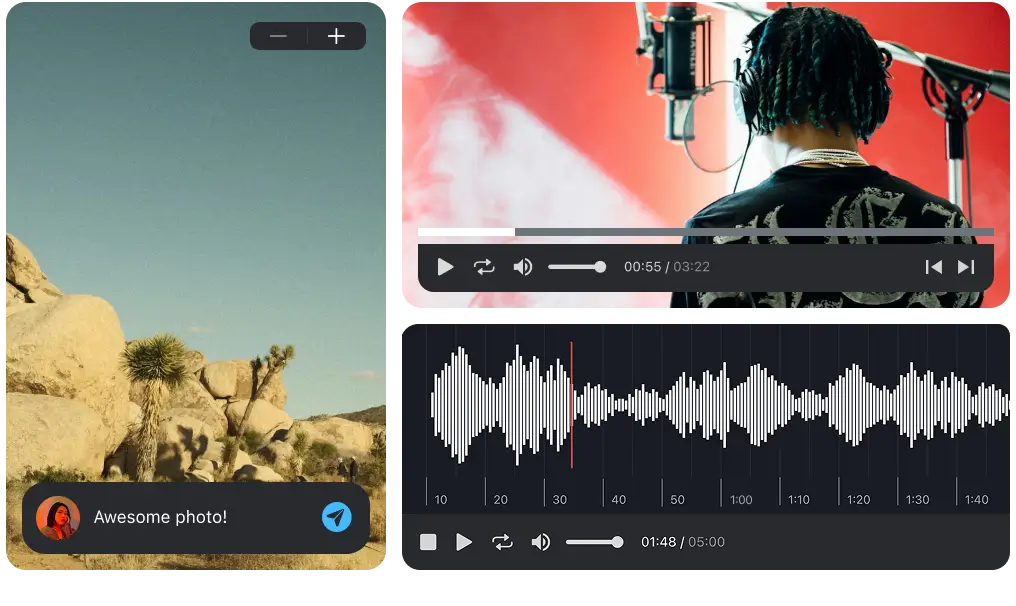
Easier, faster way to collaborate in real-time, collect feedback, manage reviews, share, and finish your projects effortlessly.
When to choose Pibox
Choose Pibox if:
• You need precise timeline comments with waveform context
• Feedback must persist as versions change
• You share unreleased work privately
• Approvals matter as much as commentary
• You want one tool that replaces email threads, chat apps, and scattered links
Even deeper: how these tools compare
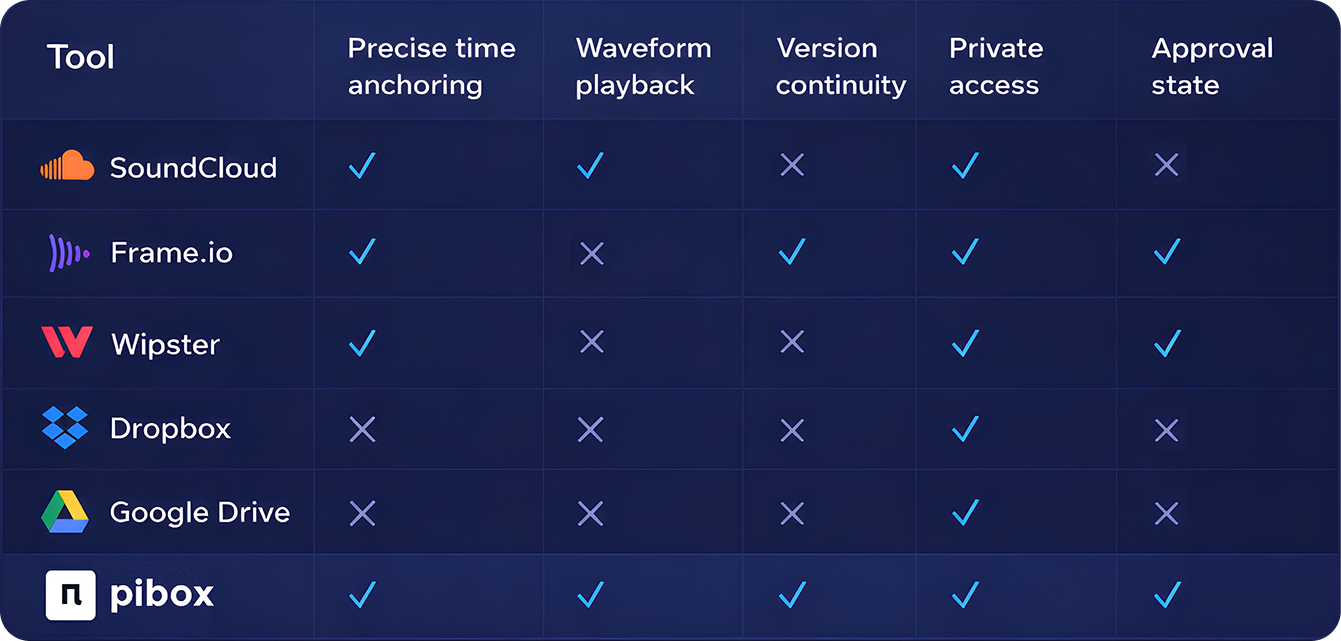
This comparison table below highlights how leading audio review and file-sharing platforms stack up across the features that matter most to modern music teams.
Final thoughts
Timeline-based audio feedback isn’t just about leaving notes. It’s about creating shared clarity and speeding up creative cycles. While many tools offer timeline comments, few are built with music workflows at their core. Pibox stands out by combining precision, security, version continuity, and approval clarity. Everything modern music teams need.


